Address #1 Client Complaint & Track Client Satisfaction
Nov 3, 2025
The #1 complaint we see from clients is "hey I tried calling, emailing, and texting my lawyer but I haven't heard from him in months and he's not responding to anything. I have no idea what's going on."
Not only is consistent status update important, setting expectations with the client is even more important. Often, clients don't care how long it takes - they just want to know what to expect. For example, if you just filed their documents with the court - some times all they need is an email that tells them "We just filed your documents with Los Angeles County, expect a 30 day turnaround."
How can I automate this?
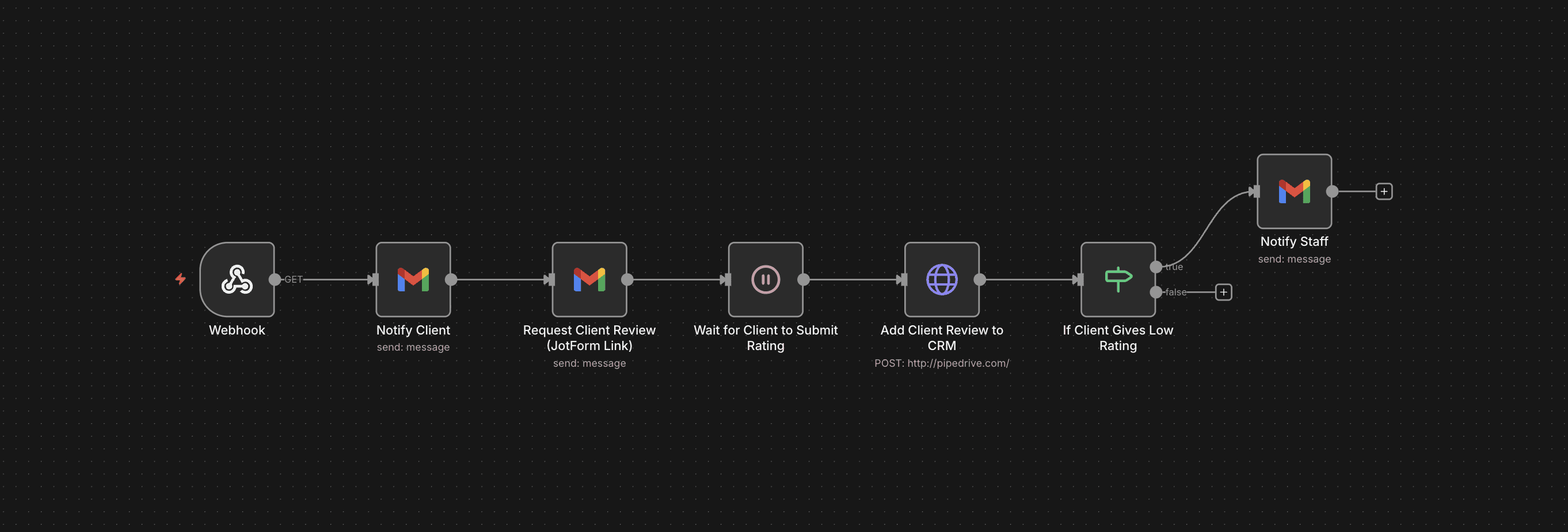
This n8n workflow show how to proactively communicate with clients as they go through each phase of the case lifecycle. It accomplishes two things:
Notifies the client, sets expectations on timeline & next steps, and share any documents necessary for them.
Asks the client for a rating. It's often helpful to get the client's feedback after key phases for long cases (or perhaps just getting a review from them at the end. Extremely helpful to boost your visibility!)
Workflow Explanation:
Webhook Node: This detects specific updates to the client's status in your CRM. (e.g. lead's status changes to "documents filed")
Gmail Node #1: Sends a templated email to client letting them know what just happened and what they can expect going forward.
Gmail Node #2: Sends the client a JotForm asking them to rate their experience 1-10 and gather feedback.
Wait Node: Waits for the client to submit their JotForm response
HTTP Node: Adds client's JotForm response to your CRM
If/Else: Checks if the client gave at least a rating of 8 or above.
If the client gave a rating of 7 or lower, it sends an email to your staff asking them to follow-up with the client.
What tools do I need?
We use these tools in the example but there are many options you can choose from:
PipeDrive (or CRM of your choice)
Gmail
JotForm for survey