Automatically Transcribe, Summarize, and Save Client Calls to CRM
Dec 1, 2025
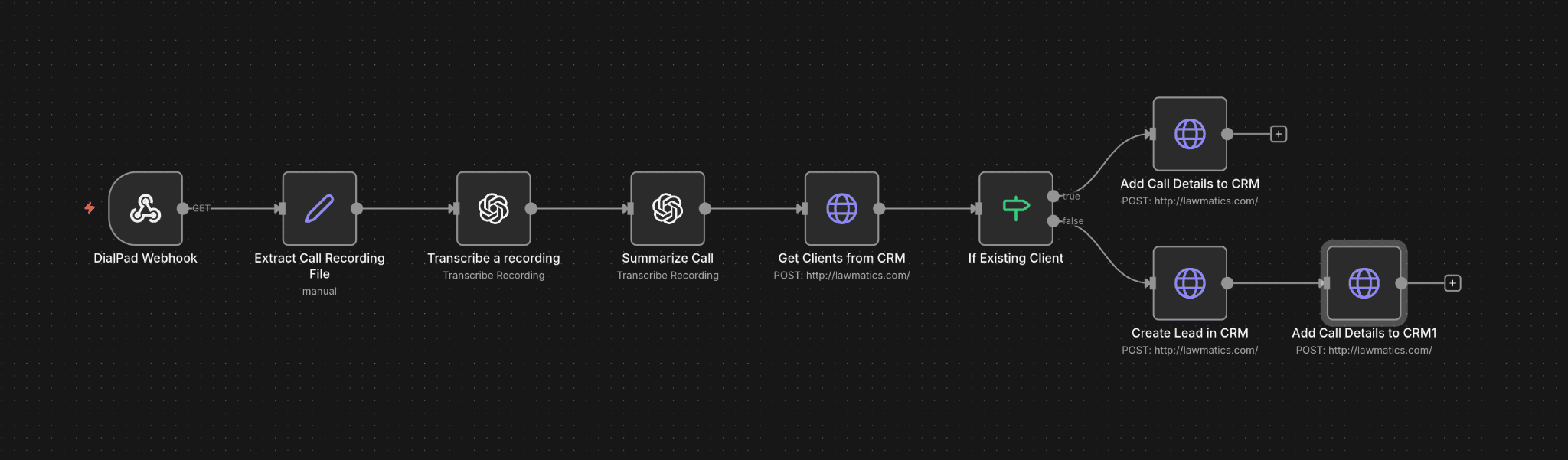
One of the most powerful and simple automations is the ability to automatically save, analyze, and store your client calls.
Why is this powerful?
Note-Taking: Your team doesn't have to worry about taking notes during the call. The automation will save and summarize the most important items in the call. It will store it in your CRM for future references too.
Automating Other Processes: The automation can detect certain agenda items and can automatically kickstart other workflows like sending booking link, generating documents, creating payments, and more.
Process Optimization: Once you gather enough data points, you can analyze the calls and identify how to improve information flows to the client.
How can I automate this?
This n8n workflow makes sure every completed Dialpad call turns into a clean CRM record automatically with a transcript + summary tied to the right person.
It accomplishes two things:
Captures the call context instantly (transcript + summary), so nothing gets lost.
Routes it to the right record in your CRM (existing client) or creates a new lead (new caller).
Workflow Explanation
DialPad Trigger Node: Dialpad fires a webhook the moment a call ends. That webhook triggers this n8n workflow and includes call metadata (caller number, recording info, etc.).
Extract Call Recording File: This step grabs the recording URL / recording file details from the webhook payload so downstream steps can process the audio.
Transcribe a recording (ChatGPT): n8n sends the recording to ChatGPT to generate a full call transcript.
Summarize Call (ChatGPT): Then it creates a clean summary (what the caller wanted, key details, promised next steps, urgency, etc.)
Get Clients from CRM (Lookup by phone number): n8n searches your CRM for an existing record matching the caller’s phone number.
If Existing Client: Checks if the caller's phone # exists in CRM
True (match found): Add Call Details to CRM → attaches the transcript + summary to the existing client/contact/matter record.
False (no match): Create Lead in CRM → creates a new lead/contact using the caller info, then
Add Call Details to CRM → attaches the transcript + summary to that newly created lead.
What tools do I need?
Dialpad (webhook trigger + call recordings)
n8n (workflow automation)
ChatGPT (transcription + summarization)
Your CRM (PipeDrive, Clio, HubSpot, Lawmatics, Monday.com, etc.)